Beta

Shop Manager Lite

Jobs, estimates & invoices, VIN decode, year-accurate engines, real vehicle photos, a live command deck, scheduling with Google Calendar, inventory and analytics — built for mechanics, not accountants.

Version 7 · The Project Car Update Works offline Your data stays on your machine No subscription

Not sure which one? Compare the three editions — each has its own guide page.

Shop Manager Lite is in open beta — polished daily, and your shop’s data always stays on your machine.

🔒 Enter your license key to unlock the download

Don’t have a key yet? See pricing & how to buy →

✓ Unlocked — your downloads are ready below.

Use a different key
SHOP MANAGER LITE // COMMANDLIVE DEMOMON 09:41:07
Revenue today
$0.0K
Active jobs
0
Outstanding
$0.0K
Bays live
4/4
Shop floorclick a bay
BAY 1
Sophie Gagnon
Oil change · ready for pickup
BAY 2
Marc Tremblay
Brakes · on the lift
BAY 3
Dyno Dave
Dyno tuning · on the lift
BAY 4
Julie Roy
Suspension · approved
Monthly targeton track
0% $13.3K / $18K
4
Estimate
2
Working
1
Ready

Ten looks, one shop

Tactical Dark
The shop-floor default
Light
Clean daylight mode
High-Vis Day
For a bright garage
Midnight
Deep navy, easy at night
Carbon
Blacked-out carbon fiber
Emerald
Green on black, calm
Redline
Race red on charcoal
Garage Amber
Warm industrial glow
Neon
Cyberpunk magenta & cyan
Sepia
Warm paper, low strain

Click a look — the whole site wears it (and remembers it on every page). Tactical Dark brings back the default.

Plus Easy / Standard / Pro experience levels, Solo-mechanic mode, Compact density mode, and English · Français · Español.

Three ways to get it

Same app in all three — every feature, fully offline, your data on your machine. The only difference is how it arrives and whether the AI engine is pre-installed.

NOT SURE? Answer three quick questions — we'll point you at the right one.
1 · Where will it live?
2 · AI estimates?
3 · The download?

Simple pricing. Pay once.

Base
Everything to run the shop
TBDone-time · CAD
Founders$99 Projected MSRP$149
3 PCs
  • Every shop feature — jobs, estimates & invoices, VIN decode, scheduler, inventory, analytics, Dyno Lab, Project Car build planner, tuner tools
  • Full digital vehicle inspection (DVI) with printable report
  • Works 100% offline — your data stays on your machine
  • Runs on 3 PCs
  • AI-ready — add free local AI (Ollama) or your own API key
  • Free updates within Release 1
Get a Base key
Most popular
Pro
The shop, plus offline AI
TBDone-time · CAD
Founders$149 Projected MSRP$299
10 PCs
  • Everything in Base
  • Offline AI built in — Smart Estimates work day one, no setup, no per-use cost
  • Runs on 10 PCs
  • Priority email support
Get a Pro key
Business
Multi-location & fleets
TBDone-time · CAD
Founders$349 Projected MSRP$499
Custom PCs
  • Everything in Pro
  • Custom number of PCs
  • Priority support
  • Volume pricing
Contact us

Final pricing is being confirmed. Founders pricing is projected for the first shops on board — you help shape the product, the price stays yours. Standard MSRP applies after.

One-time purchase — no subscription, ever. Prices in CAD. Your license key unlocks the download and registers your copy: activate once, then fully offline.

Pay once. It's yours.

One-time purchase No subscription Buy it once and own it — no monthly fee, no contract, no per-user pricing. It keeps working whether or not you're online, and your shop's data never leaves your machine.
Shop Manager Lite Typical shop software (Shopmonkey · Tekmetric · Mitchell1)
What you payOnce, up frontA subscription every month — forever
ContractNone — no lock-inMonthly or annual commitment
Where your data livesOn your PC, in your shopOn their cloud servers
Works with no internetYes — fully offlineNo — down when the internet is
If they raise prices or shut downKeeps running — it's already on your machineYou lose access to the tool and your data
SetupDouble-click the installer, start writing jobsAccount setup, onboarding calls, data migration
AI estimatesBuilt in and offline (AI edition) — no per-message feesHigher tier or a paid add-on, cloud-only
Shop floor + invoicing + dynoAll included, one priceOften split across pricing tiers

Built for the solo shop and the small crew — everything you need to run the day, none of the monthly bill. Not a knock on the big platforms; a different deal for shops that just want to own their tools.

Built in a real shop — read the story →

Everything a shop day needs

🧾

Jobs → invoices, fast

Describe the job in plain words and AI fills the form — vehicle, labor, parts, payment. Print estimates and invoices, or copy them as text for SMS.

🔍

VIN decode + recalls

Scan or type a VIN: year, make, model and engine fill themselves (NHTSA), with open safety recalls one tap away.

📸

Real vehicle photos

Pick a make, model and year — a matching photo of that generation loads by itself. Or drag in a photo of the actual car; it saves with the job.

🗓️

Scheduler + Google Calendar

Week-view booking board. Send any appointment straight to Google Calendar, or export the whole schedule as an .ics file.

📦

Inventory parts wall

Stock shown as bins on a shelf with live fill gauges. Parts auto-decrement when jobs use them; low-stock warnings before you run out.

📊

Analytics & targets

Revenue, margins, best jobs, monthly goals — with a little confetti when the shop hits its target.

🗂️

Work Board

Drag jobs between Estimate → Approved → Working → Ready. The whole floor at a glance.

⏱️

Tech time clock

Track real wrench time against billed hours, per job — know which jobs actually pay.

Digital inspections + log

Walk the car on a tablet — rate each point green/yellow/red with measurements and photos, then print or text a clean report. Every inspection is saved, and the Inspection Log reopens or reprints any past one in a tap.

💾

Yours. Offline.

No cloud, no account, no monthly fee. Data lives on your machine and can sync to a USB stick you carry between computers.

Built with tuners in mind

🔧

Year-accurate engines

The Year field actually changes the engine list. A '92 Integra shows B-series; a 2018 M3 is an F80 — never a modern turbo pasted on a classic.

🏁

Tuner Mode

Drivetrain and forced-induction fields that auto-detect from the engine (STI → AWD turbo, GT-R → twin-turbo DCT). Dyno results save with the job.

Performance calculators

E85 blend, AFR ↔ lambda, wheel-to-crank HP, dyno gains — the math you do on a napkin, built in.

🏎️

Project Car build planner 🏎️

Set the car, engine code and budget and it plans the build — real Stage 1/2/3 power mods (handling parts kept separate, grip before power), projected wheel-HP, a live budget tracker, and add-your-own mods. Turn the whole build into a customer estimate in one click.

Take the tour

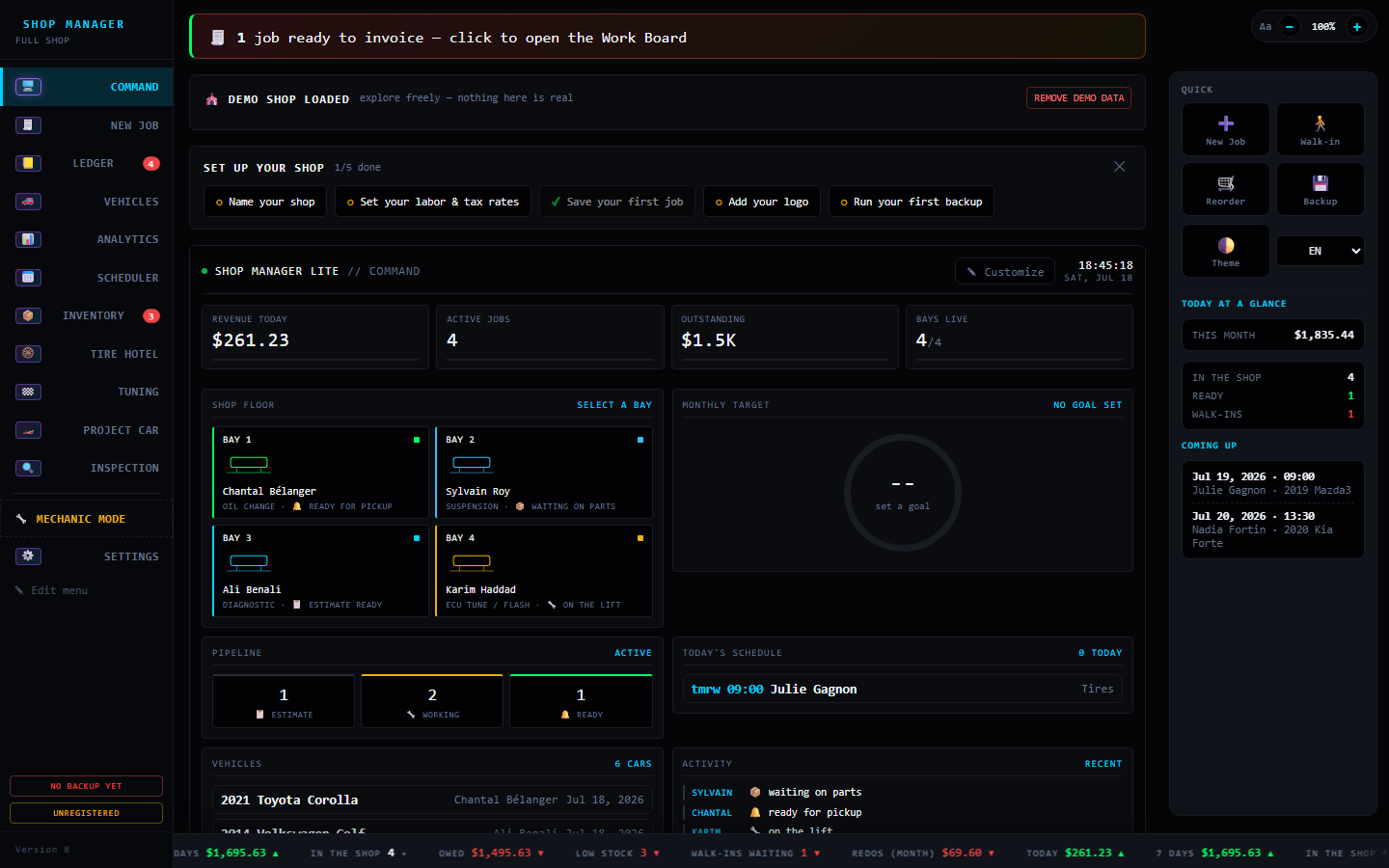
Command — the home screen: live bays, today's money, the job pipeline and monthly target, all ticking in real time. It's the demo at the top of this page.
BAY 2 · Marc TremblayOn the liftbrakes · 1.4 h
BAY 1 · Sophie GagnonReadyoil change · $89
TODAY$2.4K in$3.3K owed4 bays live
New Job — describe the job in plain words and AI fills the form: vehicle, labor, parts, prices. VIN decode, year-accurate engines and real vehicle photos included.
"2014 Golf TDI, front pads and rotors, customer waiting"
AI→ VW Golf 2014 [CJAA] · Brakes · 1.5 h labor · pads + rotors added
Estimate total$412.30tax + shop fees included
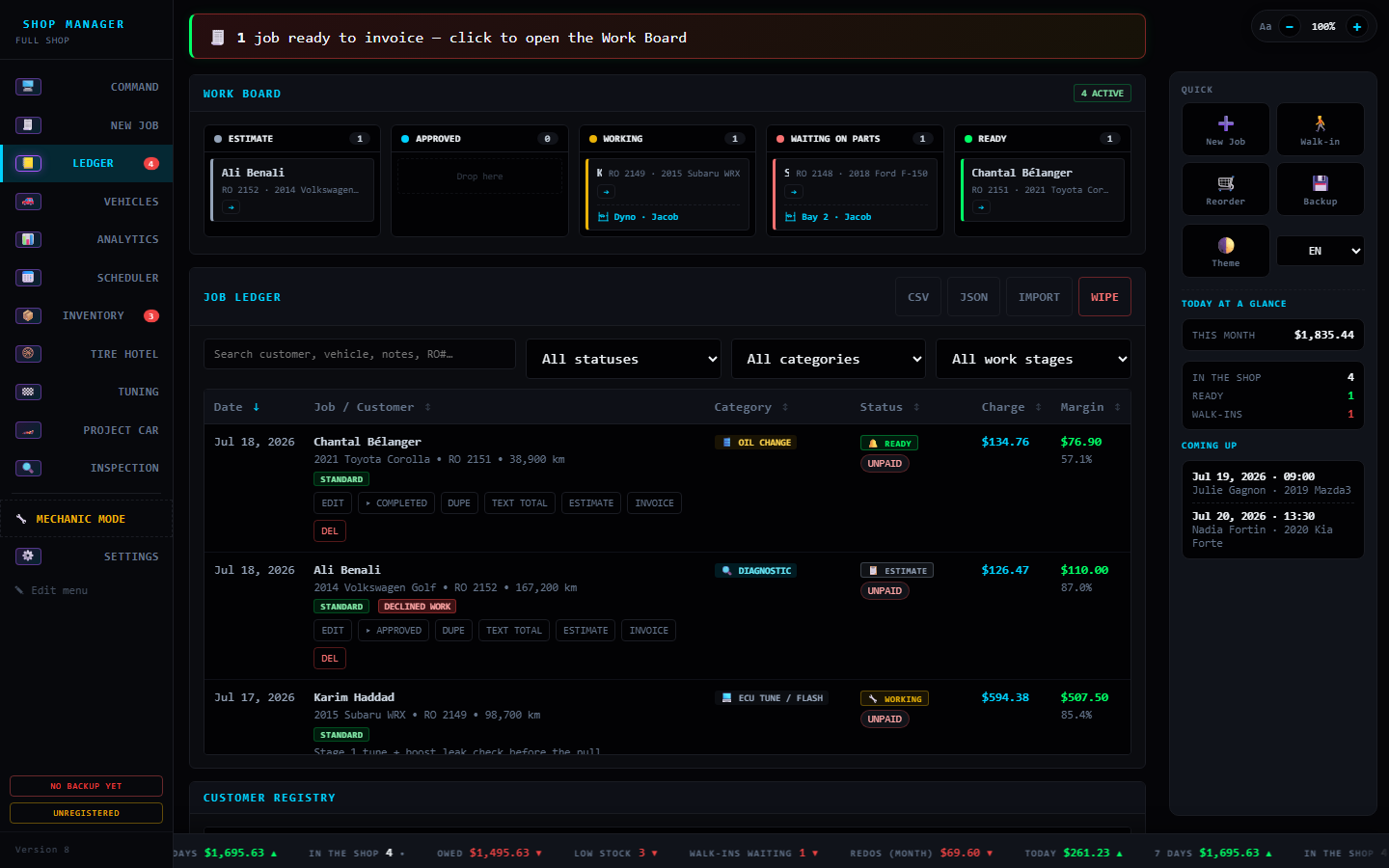
Ledger — every job, searchable and filterable. Payment status, balances and margins at a glance; print or text an invoice from any row.
07-05 · J. Roy · SuspensionPaid$780 · 41% margin
07-04 · M. Tremblay · BrakesPartial$412 · $200 due
07-03 · Fleet Bélanger · 4× oilInvoiced$356 · net 30
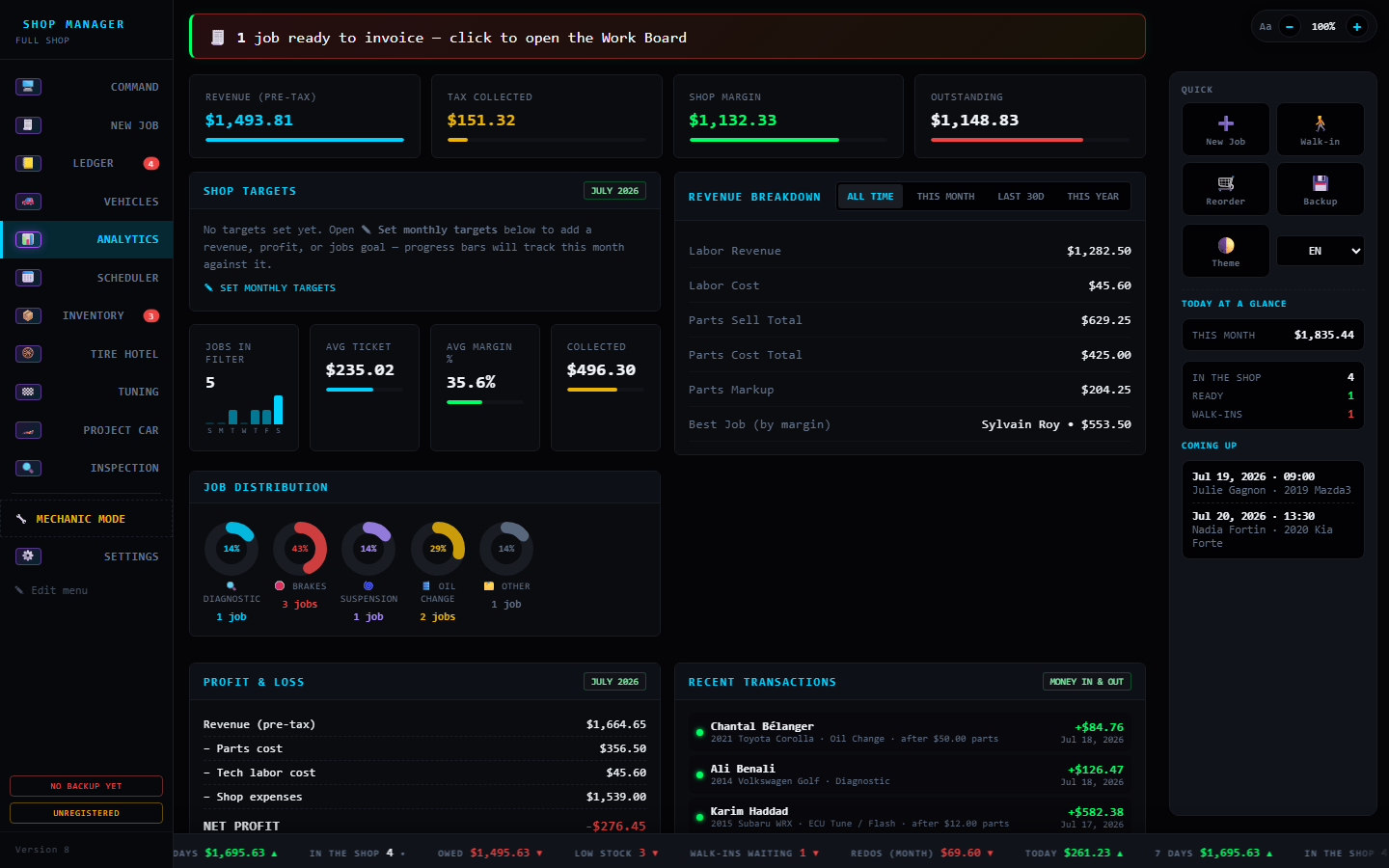
Analytics — revenue, margins, best job types and monthly targets. Confetti when the shop hits its goal (yes, really).
Revenue by week — best month yet
Scheduler — a week-view booking board. One click sends an appointment to Google Calendar; the whole schedule exports as .ics.
Mon
8:30 Gagnon · oil
13:00 Roy · align
Tue
9:00 Tremblay · brakes
Wed
10:30 fleet × 4
Thu
14:00 dyno pull
Fri
8:00 Fortin · exhaust
15:30 pickup
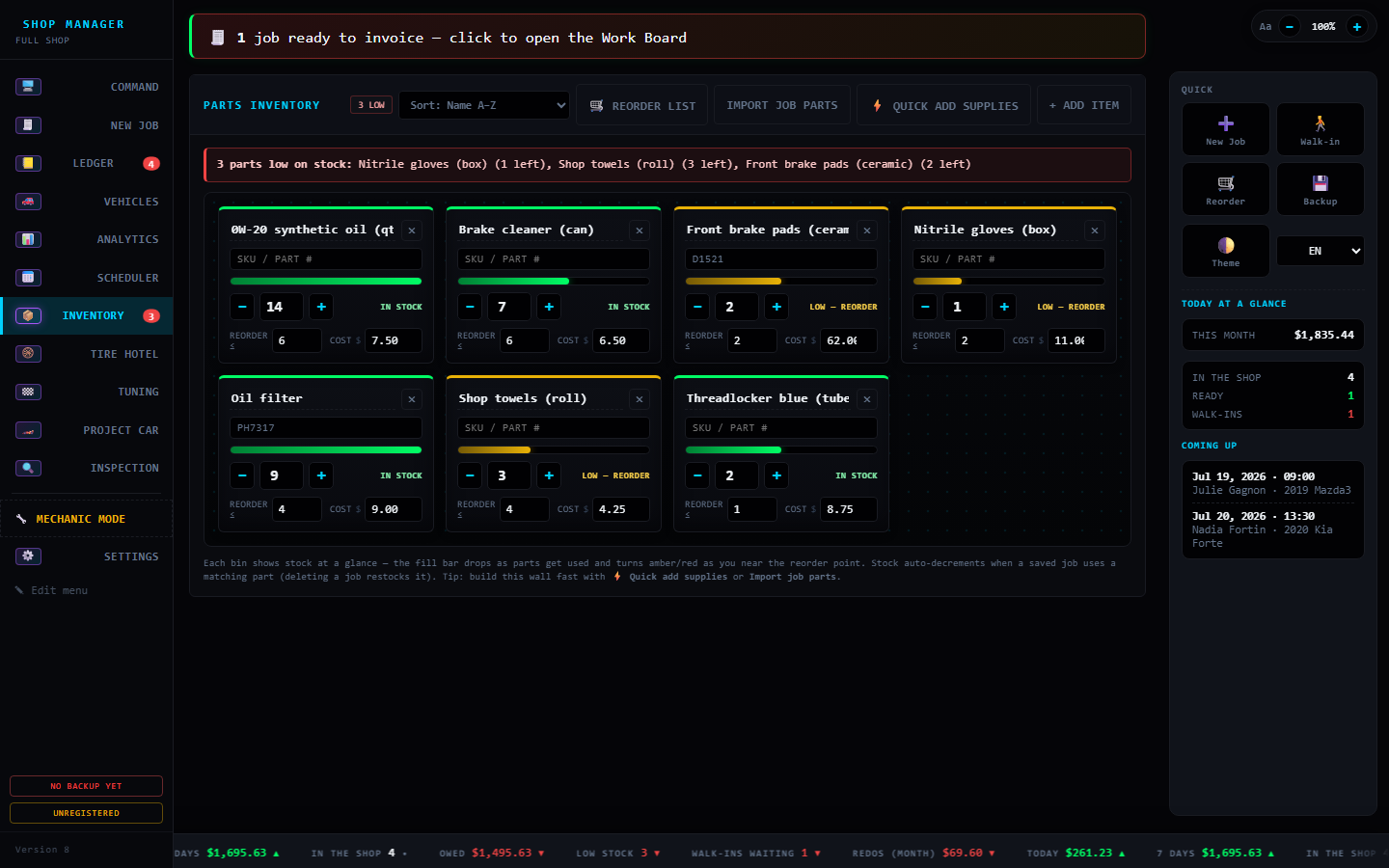
Inventory — parts as bins on a wall with live fill gauges. Stock auto-decrements when a job uses a part; low-stock warns before you run out.
Oil 5W-30
Pads (F)
Rotors
Filters
Coolant
Wipers
Coolant low — reorder suggested
Tire Hotel — seasonal tire storage, tracked. Who's storing what, where it's racked, and who to call when the season flips.
Rack A-3 · GagnonWinters inMichelin X-Ice · 205/55R16
Rack B-1 · RoyWinters inBlizzak · 225/45R18
Rack C-2 · FortinCall for swapsummers stored since Nov
Dyno Lab — import a pull CSV (Virtual Dyno, Dynojet…) and get the real HP & torque curves, peaks marked, plus shop-wide gains over time.
412 whp
HP (solid) · TQ (dashed) — before/after saved with the job
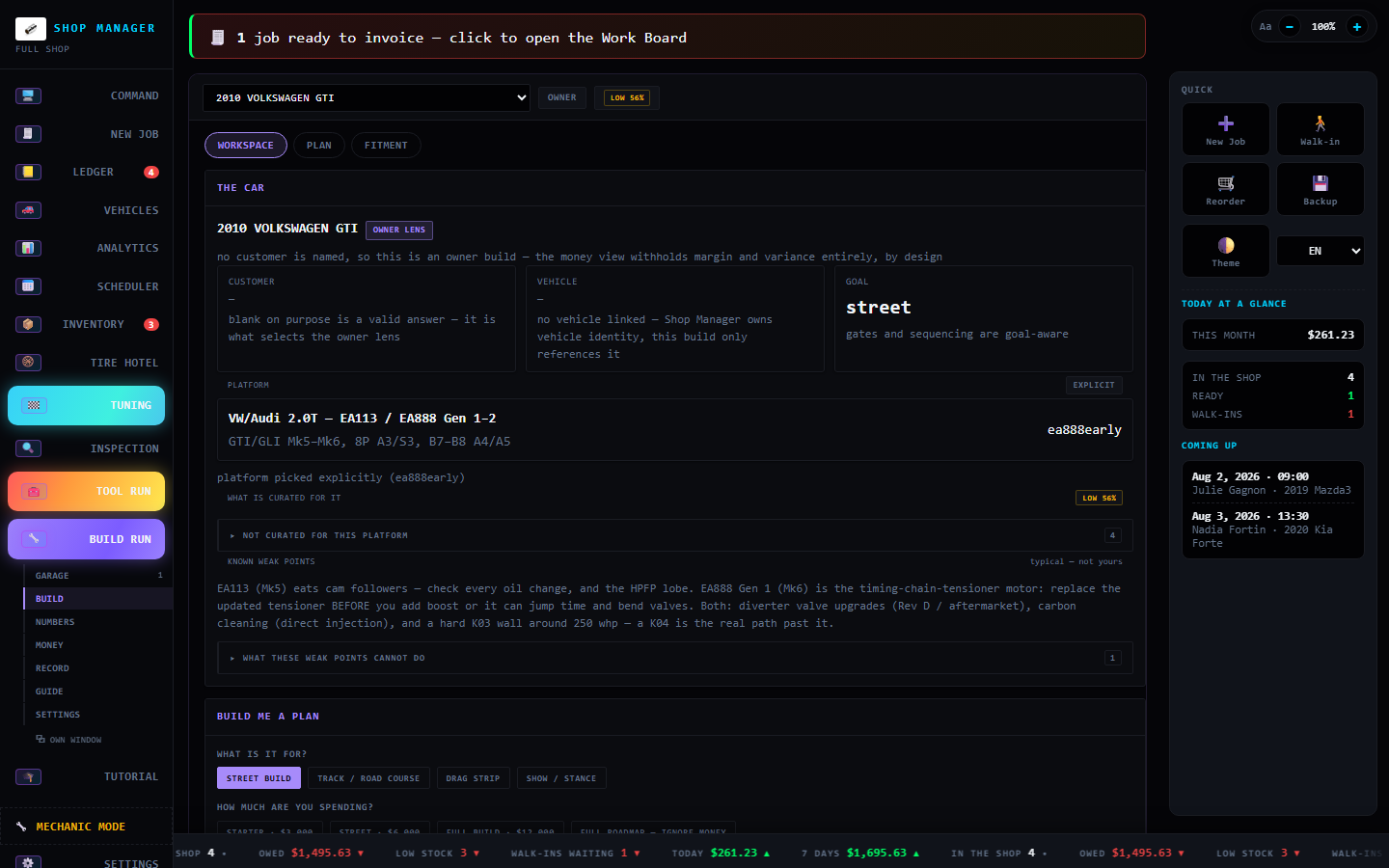
Project Car — plan a build by budget: power mods staged 1/2/3 by what they actually need, handling parts grouped grip-first, projected horsepower and a live budget bar. One click turns it into a customer estimate.
2015 Camaro SS · LS3318 → 543 whp$8.9K of $15K
Stage 1Cold-air intake + tune+15 whp
Stage 2Long-tube headers + tune+25 whp
Stage 3Bolt-on supercharger+200 whp
🏁 Chassis — grip before powertires · brakes · suspension
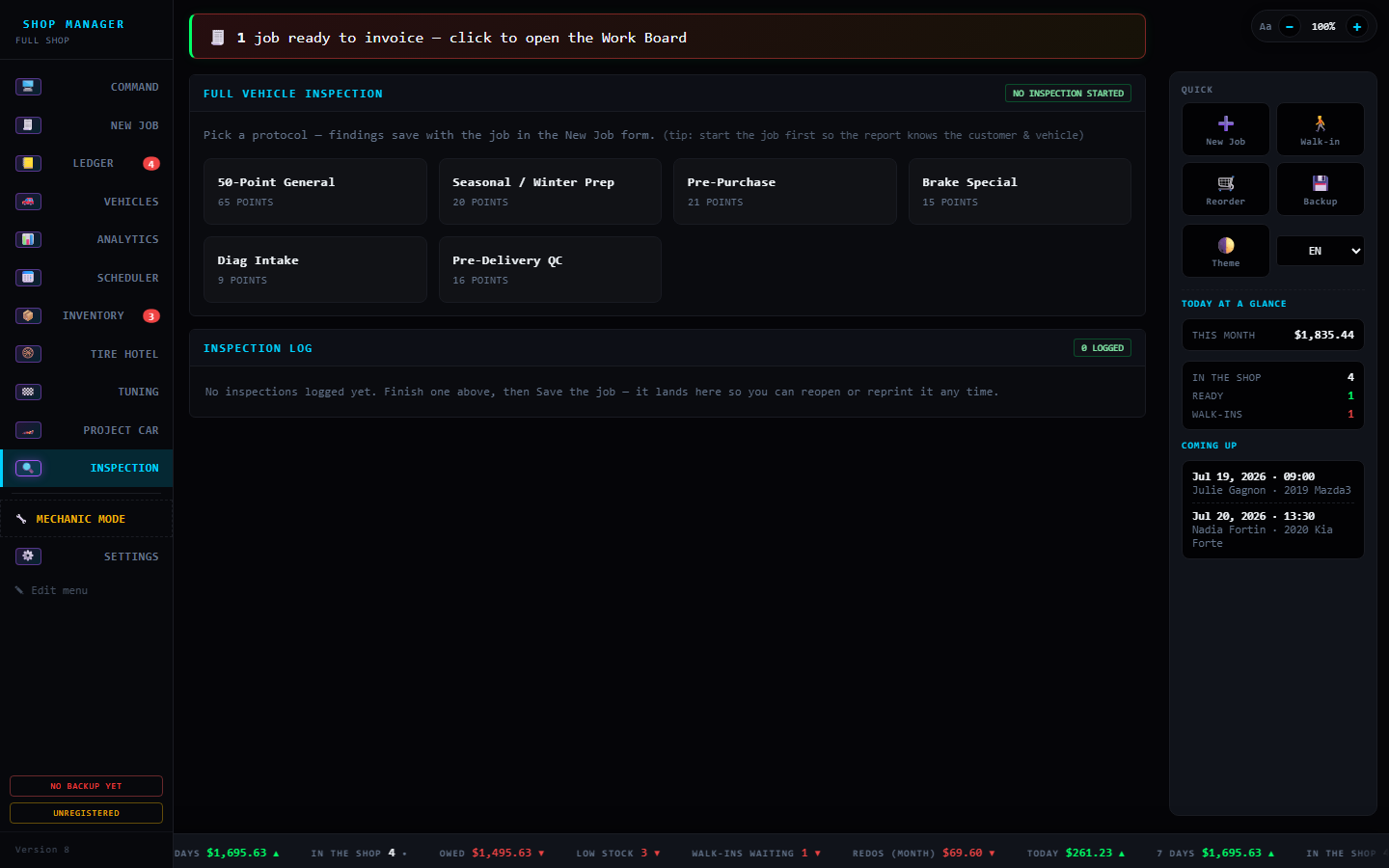
Inspection — a full digital vehicle inspection: rate each point green/yellow/red with measurements and photos, print a branded report, and reopen or reprint any past inspection from the log.
Front brakes — padsGood8 mm
Tire — front leftWatch4 mm
Battery — restingAttention11.9 V
INSPECTION LOG3 loggedreopen · reprint

Straight answers

Is there a monthly subscription?
No. Shop Manager Lite is a one-time purchase — pay once and it's yours. No monthly fee, no per-user pricing, no contract to cancel.
Do I need internet to use it?
No — the app runs fully offline. Jobs, invoices, scheduling, inventory, analytics and (on the AI edition) the AI estimates all work with the internet unplugged. Internet is only used for optional extras: VIN decode, pulling vehicle photos, and Google Calendar send.
Where does my shop's data live? Is it safe?
On your machine — nothing is uploaded to a cloud we control. There's no account and no server holding your customer list. You can back it up to a USB stick and carry it between computers, and it makes automatic daily backups on its own.
What happens if you stop updating it or disappear?
It keeps working. Because the app and your data already live on your PC, nothing switches off — unlike cloud software, there's no server to go dark. You bought it; you keep it.
Which edition should I get?
Most shops want the Standard Installer. Grab the Portable Zip if you can't install software or want it on a USB stick, or the AI Edition if you want AI estimates working day one with no setup. Not sure? Take the 3-question quiz →
Do I need an API key or account for the AI?
Not on the AI edition — a free AI model ships inside and runs on your own PC, no key and no per-message cost. On the other editions you can turn AI on anytime with either a free local install (Ollama) or your own Anthropic API key.
Can I run it on more than one computer?
Yes. Install it on the shop PC and sync your data to a USB stick to move it to another machine — the data file travels with you. There's also a phone-friendly web version for quick lookups.
Does it run on Mac?
The desktop app is Windows. On Mac or phone you can use the browser/PWA version for the core workflow.

What's new

Version 7The Project Car Update 🏎️
  • Build by target, one click. Pick a power stage (Stage 1 / 2 / 3 — each showing the wheel-hp it makes) or a budget, and Project Car drops the whole package in. The mods change with the goal: a drag build spends on power and launch, a track build on grip.
  • Supporting parts come along. Add a turbo, supercharger or nitrous and it automatically adds the tune, fuelling and clutch it needs to run safely — no more half-finished builds.
  • Horsepower and torque, honestly. Each stage shows one "Stage total" that always climbs (Stage 2 beats Stage 1), and the cockpit now reads live horsepower and torque as you build — torque estimated from the power gains, so put it on a dyno for exact numbers.
  • Sharper all around. Stock horsepower auto-fills from the platform, engine-by-year data is more accurate, you can reach customers by email as well as phone, and the parts markup % is now type-able. The performance & tuner tools moved into the Tuning tab, and the guided tour covers it all.
v6.10.4Project Car, leveled up 🏎️
  • Real staging, finally. Stage 1 / 2 / 3 now means what tuners mean, and only for power: Stage 1 runs on stock hardware (tune, intake, cat-back), Stage 2 is supporting hardware that needs a tune (headers, downpipe, intercooler, cam, fueling), Stage 3 is forced induction. Brakes, suspension and tires aren't "stages" — they're grouped grip-before-power, the way a shop actually builds a car.
  • A proper build cockpit. A cover banner with the car's photo, a projected horsepower read (stock → built), a live budget tracker with cost-per-horsepower, and an install-progress ring — plus goal chips, a 💭 Dream-build mode that shows the whole roadmap with the budget off, and a printable build sheet the customer keeps.
  • Add your own mods. Anything the database or the offline AI doesn't cover, just type it in — name, area, price, expected gain — and it slots into the plan, counts toward the horsepower total, and drops onto the estimate like the rest.
v6.10.2Inspection Log — every inspection, kept
  • Never lose an inspection. Every digital vehicle inspection you finish is now saved to an Inspection Log — customer, vehicle, date and the green / yellow / red tally at a glance. Reopen one to edit it, or reprint the report for the customer, in a single tap.
v6.10.1Ten looks, all readable — and the whole site wears them
  • Every theme, easy on the eyes. Fixed the spots where the light themes (Light, High-Vis Day, Sepia) showed dark text on dark panels — starting with the Good / Better / Best estimate options editor. All ten looks are now clean in daylight or a dark bay.
  • Try any look right here. The theme picker up top now dresses this whole website in your chosen theme and remembers it on every page — click a look and see it for real.
v6.10.0Project Car — the budget build planner 🏎️
  • Plan a build by budget and what you're modding. Pick the car, punch in the engine code and a budget, and Project Car recommends the upgrades — a whole staged build (street / track / drag / show) or ranked picks for just the area you're working on: engine, suspension, brakes, drivetrain, wheels or aero.
  • Knows 19 platforms by engine model code. LS & Coyote, Hemi, 2JZ, RB26, SR20, K- and B-series, EJ, 13B, VQ, B58, N54, EA888 and more — each with real aftermarket prices, honest power gains, and the known weak points to watch before you spend. Anything it doesn't know, the built-in offline AI plans for you.
  • Turn a build into an estimate in one click — every part drops onto a customer estimate ready to price.
v6.9.5Free AI, built right in
  • No API key, no cloud, no monthly cost. Shop Manager Lite now runs entirely on free local AI — Smart Estimates and every AI helper work on your own PC, fully private and free forever. The AI edition ships the model inside, so it all works the moment you install it, even offline.
v6.9.4Bulletproof sync & whole-shop backups
  • Nothing gets wiped anymore. USB sync now merges everything between computers — jobs, inventory, your specs library, paid status and your shop logo all travel safely, and a sync from an empty or older machine can never erase data it hasn't seen.
  • Back up your whole shop, not just jobs. Export/import now carries everything — jobs, inventory, templates and settings — in one file.
  • Now fully trilingual. Every newer feature is translated into French and Spanish.
v6.9.0Money management, leveled up
  • A real payment ledger. Record deposits, partial payments, refunds and write-offs on a job — not just "paid" or "unpaid." Balances always add up.
  • Know where the money is. AR aging shows who owes what and how overdue, a cash reconciliation squares the day's takings, and a money audit trail logs every change.
  • Mark-as-paid, rebuilt. Rock-solid now, with older paid jobs healed automatically so nothing reads $0 by mistake.
v6.8.0Built for a two-person shop
  • Mechanic & front-desk modes. Flip a bay tablet to Mechanic mode — fewer, bigger, simpler screens for gloved hands — while the front desk keeps the full view. Jobs hand off cleanly through their status.
  • Easier for everyone. A first-run guided tour for new shops, hi-vis lettering for the shop floor, and tasteful motion polish across the whole app.
v6.4.1USB sync fix — no more lost jobs between computers
  • Safer USB sync. Moving your data between computers used to let an older copy overwrite newer work. Sync now merges instead: where the same job exists on both machines, the most recently edited version is kept, and no job is ever silently lost. Deletes sync too — a job you delete on one PC stays deleted everywhere.
v6.4.0The Tuning Update — dyno numbers for every shop
  • Record a pull from the laptop. Plug a $15–40 OBD-II adapter into the PC and the new Tuning hub streams live RPM, speed and temps, records the pull, and computes the wheel-HP/torque curve itself — no phone, no file shuffle. A Demo Drive mode shows the whole flow with no car connected.
  • Stock HP & torque, built in. Pick the car (or decode a VIN) and factory figures auto-fill from a hand-checked table of 140 popular engines plus the NHTSA record — with a variant picker for Si / Type R / SS-style trims.
  • Engine health vs stock. A measured pull is compared against the expected wheel-HP band for that drivetrain: Healthy, Down on power, or Needs diagnosis — with a checklist of usual suspects. Prints on the branded dyno sheet. "It should make 230 and it's making 180" is a work order, not a guess.
  • Street numbers. Dragy/RaceBox GPS figures (0–60, 60–130, ⅛ & ¼-mile, trap speed) live on the job and the printed sheet; trap speed + weight gives an instant HP estimate.
  • The Tuning hub. Dyno Lab grew into one Tuning section with a "No dyno? Start here" walkthrough and a Free / Budget / Shop gear-up list — the path in costs $0 to start and about $30 to get real curves. Read the full guide →
Release 1Shop Manager Lite — first release
  • New name: the app is now Shop Manager Lite — same tool, ready to share with other shops.
  • One-click Windows installer with its own window, Start-menu and desktop shortcuts.
  • Bundled offline AI: a free local model ships inside, so AI estimates work with no API key and no internet.
  • Backup at a glance: a sidebar chip shows when your data was last backed up — click it to back up on the spot.
  • Set-up checklist for new shops: name, rates, logo, first backup — the app shows you exactly what to do first.
  • Recent-customer quick pick and a "Text total" button that copies a customer-ready message with the job total.
  • Fix: in-progress Smart Estimates now autosave for crash recovery, like the inspection map.
v6.1.0Free Local AI (Ollama)
  • New AI Provider toggle in Settings — keep the Anthropic cloud API, or switch to a free, fully offline model running on your own PC via Ollama. No API key, no cost.
  • Every AI button works unmodified with either provider.
v6.0.0Smart Estimates — the Customer Experience release
  • "In plain terms": jargon-free job explanations customers actually understand — hand-written or AI-drafted.
  • Good / Better / Best options with prices and what's-included bullets, on a branded printable options sheet with a Recommended ribbon.
  • Honest profit everywhere: manual jobs now count real parts cost, so P&L, margins, ledger and targets all agree.
  • New Recent Transactions panel — money in green, money out red.
v5.3.0Estimate & Invoice Designer
  • Make estimates and invoices yours: upload your logo, pick an accent color, and choose a look — Classic, Modern, or Bold — with a live preview.
  • Custom thank-you message, warranty statement, terms & conditions, and GST/TPS + QST/TVQ registration numbers on every sheet.
  • Show/hide the Taxable column, inspection findings, mileage, notes, signature line, and payment status.
v5.2.0Dyno Lab
  • Import a pull CSV (Virtual Dyno, Dynojet, Mustang Dyno…) and see the real HP & torque curve with peaks marked.
  • Before/after bars from the baseline & final figures you already enter, plus a shop-wide gains-over-time chart.
  • Financial engine hardening: true loss visibility, prorated tax on discounted mixed invoices, local-time day rollover, inventory floor.
v5.1.xMobile PWA + touge intro
  • Install on your phone: full PWA with iOS support, phone-sized UI, and download links.
  • Touge drift intro with your shop name over the mountain pass.
v5.0.0The Shop Co-Pilot
  • Auto-backups, Ctrl+K command palette, and a guided job flow.
  • Tire Hotel, digital inspection checklist, on-screen signatures, job timeline.
  • Money Brain: real P&L, GST/QST report, End-of-Day close, overdue chase-texts, team efficiency, comeback reminders.
  • Offline DTC lookup, self-building specs library, branded dyno sheets, and Shop Wrapped. 🎁
v4.7.0Google Calendar + website
  • Send any appointment to Google Calendar in one click, or export the whole schedule as .ics.
  • This preview website.
v4.6.xAutomatic, year-accurate vehicle photos
  • Pick a make/model/year and a photo of that generation loads itself — cached for instant reuse.
  • Your own drag/paste photo always wins. What's-new screen added (click the version number).
v4.5.xPhotos, themes, density
  • Vehicle photos saved with jobs; Claude Night & High-Vis Day themes; Compact Mode; tablet-friendly layout; stale-update fix.
v4.4.0Engines, transmission, tuner
  • Year-accurate engine database with hundreds more vehicles (JDM classics to daily drivers); Transmission field; Tuner Mode; target-hit confetti.
v4.3.0Live & interactive
  • Save confirmations, animated analytics, hover/press feedback, inventory parts wall.